Trusted by startups to enterprises for high-converting PPC management

PixelCrayons specializes in transforming your Figma designs into high-performing, functional WordPress websites. We use our expertise and experience to make the process seamless, delivering a website that reflects your vision and drives results.
Experience the precision of hand-coded HTML and CSS. This allows for greater control over the final product, ensuring pixel-perfect accuracy and optimized performance for your website.
Get the attention your project deserves. A dedicated team of experienced WordPress developers works closely with and performs WordPress development tasks even if you need them urgently.
Reach a wider audience with a website that looks and functions flawlessly on all devices. With mobile-first HTML/CSS markup, we ensure your website is responsive and adapts seamlessly to different screen sizes.
See your Figma designs come to life. We dedicatedly convert your designs into clean, well-structured HTML and CSS, ensuring your website perfectly reflects your brand identity and design vision.
Get a custom WordPress theme that reflects your unique style. We craft beautiful and functional themes based on your Figma designs, offering flexibility and customization options to make your website stand out.
Extend your website’s functionality with ease. We seamlessly integrate essential plugins to enhance your WordPress website, whether it’s for e-commerce, SEO, security, or other features.
Rest assured, your website is built to perfection. We conduct rigorous testing and quality assurance procedures to ensure it is free of errors, functions smoothly across all browsers, and meets your specific requirements.
Boost your visibility online. We optimize your WordPress site for search engines, using best practices for HTML, CSS, and page speed. This ensures a smooth user experience and better rankings.
Get ongoing maintenance and support to keep your WordPress website running smoothly and securely. We provide updates, troubleshoot issues, and ensure your website remains up-to-date and performing at its best.
PixelCrayons has the expertise to turn your design vision into a stunning WordPress website.

CereBrox brings 20+ years of experience in both Figma design and WordPress development to the table. We’ve helped over 300+ clients bring their creative visions to life, seamlessly transitioning from stunning Figma designs to functional, high-performing WordPress websites.







Automate repetitive tasks, enhance efficiency, and reduce operational costs with our RPA solutions tailored to your business needs.
Here is our complete guide on Figma to WordPress conversion services that you can consider for your next big project. This will help you learn about the process, get detailed information, and get the desired results.
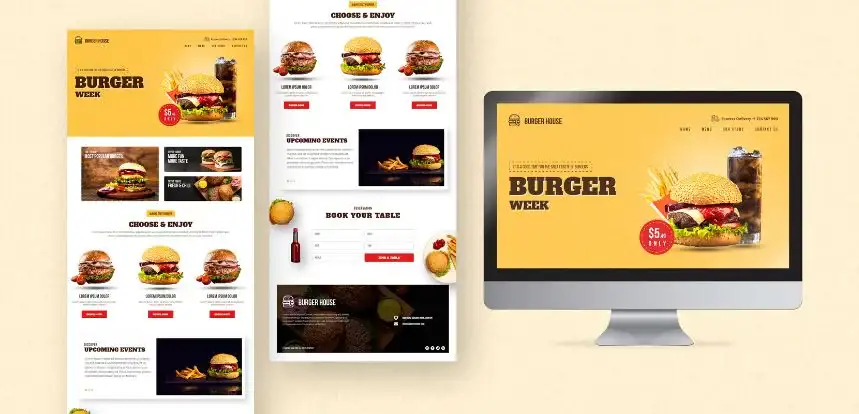
Here are the five major advantages to convert Figma to WordPress:
1. Enhanced User Experience
A WordPress website built from a Figma design prioritizes user experience. It ensures a consistent look and feel across all devices, improving navigation and engagement.
2. Improved Search Engine Optimization (SEO)
WordPress is inherently SEO-friendly, making it easier to optimize your website for search engines. When combined with a well-designed Figma layout, you can create a website that ranks higher in search results.
3. Cost-Effective & Time-saving
It can be more cost-effective and time-saving compared to building a website from scratch.
4. Content Management Flexibility
WordPress offers a user-friendly content management system (CMS), allowing you to easily update and manage your website content without technical expertise.
5. Scalability & Growth
WordPress is a scalable platform that can accommodate your business growth. As your website expands, WordPress can handle increased traffic and additional features.
By converting your Figma designs to WordPress, you can harness the benefits of both platforms to create a website that is visually appealing, user-friendly, and effective in achieving your business goals.

Converting a Figma design into a fully functional WordPress website requires careful planning and execution. Follow these steps for a successful project:
Step 1: Design Analysis and Preparation
Step 2: WordPress Theme Selection
Step 3: HTML and CSS Development
Step 4: WordPress Theme Integration
Step 5: Functionality Implementation
Step 6: Content Migration
Step 7: Quality Assurance and Launch
By following these steps and working with experienced Figma to WordPress developers, you can successfully bring your design to life as a fully functional WordPress website.

Converting Figma designs into WordPress websites can present certain challenges. Understanding these obstacles is crucial for a smooth conversion process.
Design Complexity
Browser Compatibility
Performance Optimization
WordPress Theme Limitations
Plugin Conflicts
By anticipating these challenges and working with experienced developers, you can overcome these obstacles and achieve a successful Figma to WordPress conversion.
Selecting the right development partner is crucial for a successful Figma to WordPress conversion project. Consider these factors when making your choice:
Expertise and Experience
Technical Proficiency
Communication and Collaboration
Project Management and Timeline
Pricing and Packages
By carefully considering these factors, you can select a development partner who aligns with your project goals and delivers exceptional results.

The Figma to WordPress conversion process can be tailored to meet the specific needs of various industries. Understanding these industry-specific requirements is essential for creating effective and engaging websites.
eCommerce
Real Estate
Healthcare
Education
Finance
By understanding the unique requirements of different industries, we can tailor Figma to WordPress conversions to deliver optimal results and meet the specific needs of our clients.
To achieve optimal results from your Figma to WordPress project, it’s essential to follow industry best practices. These guidelines will help ensure a high-quality, efficient, and successful conversion.
Design Consistency
Responsive Design
Performance Optimization
Accessibility
Security
By following these best practices, you can create a Figma to WordPress website that looks great, performs well, is accessible, and is secure.